
Addressing the Email
Using any mail client such as Outlook or Gmail, compose a message. The full email address should appear as 11digitfaxnumber@fax.bankeit.com. For example, 15556667777@fax.bankeit.com. It is important to always include the full 11 digits for faxing any number in the US or Canada.

Including a Cover Page
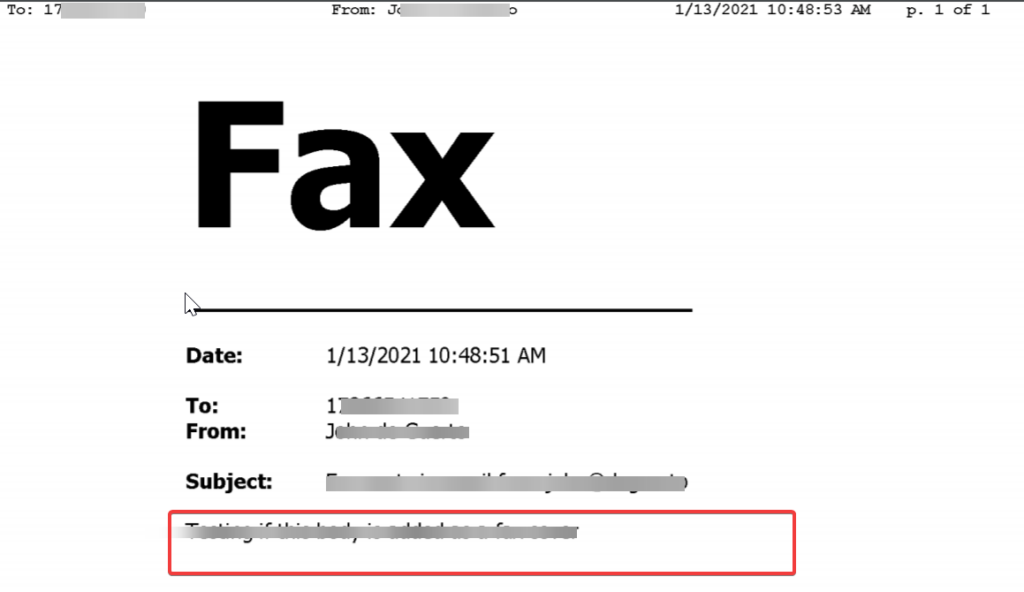
- The body from your email address will be converted to a cover page.
- You will notice that the To: field on the cover page is populated with the destination fax number by default. The From field will be the email/fax sender’s full name. Populate the email subject field.
Attachments
- You can attach multiple document types when sending a fax from the email (see below). You can attach a single document or multiple documents (varying formats are fine) and they will be rendered, converted to a faxable format, and sent to your destination fax number. Once your documents are attached, simply hit SEND. That’s it! We’ll take care of the rest.
Notes:
- Email-to-Fax total documents file size limit is 10MB after conversion. If the fax you’re sending exceeds the file size limit, you will receive a non-deliverable or NDR message in your email inbox similar to the one below.

- Sent Faxes using Email-to-Fax will not populate in the ‘Sent’ field within the Manager Portal.
Allowed Email Attachments
- Image Files (TIFF, GIF, PNG, JPEG)
- Adobe Acrobat Files (PDF)
- Microsoft Office Files (DOC, DOCX, XLSX, PPTX)
- Text Files (TXT, RTF)
Confirmation Email
After sending your fax, you will receive a confirmation email letting you know that your message was sent.